Showing posts with label TheEngineeringProjects. Show all posts

Tuesday, 14 June 2022

Getting Past Legacy Software Pains in Requirements Management


Getting Past Legacy Software Pains in Requirements ManagementLegacy software refers to a business operating software that has been in use for a long time. This is older system software that is still relevant and fulfills the business needs. The software is critical to the business mission and the software operates on specific hardware for this reason.

Generally, the hardware in this situation has a shorter lifespan than the software. With time, the hardware becomes harder to maintain. Such a system will either be too complex or expensive to replace. For that reason, it continues operating.

What is a Legacy System?

Legacy software and legacy hardware are often installed and maintained simultaneously within an organization. The main changes to the legacy system typically only replace the hardware. That helps to avoid the onerous requirements management of the software certification process.

Which Businesses Have Legacy Systems?

Legacy systems operate in a wide range of business organizations, such as banks, manufacturing, energy companies, hospitals, and insurance companies. You can also find them in the defense industry, among other multifaceted business organizations.

Legacy Software Pains in Requirements Management

Only companies born in the digital age don’t face the problem of chronic legacy system pains, i.e. the distress of a lack of digital transformation. Legacy systems can involve unbearable complexity, mismatched skills, lack of innovation, bureaucracy, and so on.

Legacy systems form in organizations for many reasons. First, compliance issues and a rollout are often challenging to carry out all at once. There may be an ongoing project that needs the old system. There are also instances where decision-makers don’t like change.

However, the shortcomings of operating an old system are annoying and can also cause severe damage to the company. The pains of operating an old system include:

Getting Past Legacy Software Pains in Requirements Management

Legacy Systems Strategies are Not Prepared For Change

Legacy systems can include the ‘Stop and Start’ strategy. There are also long static periods or unchanging business, which was the mainstream way of running business operations throughout the industrial age. This means systems have a short period to make and adapt to any necessary changes, while business stops and waits for the wave of essential changes to finish.

The world doesn’t work like this anymore. Intermittent changes allow organizations with old systems to persist up to the next phase of evolution.

Fortunately, there is an alternate option called lean IT. The model advocates for making positive changes and continuous improvements and is aimed at avoiding getting stuck in waiting mode.

The lean IT model is well suited to data-oriented and digital systems, and helps discourage the myopic views that legacy systems foster in the first place.

Legacy Systems Create Security Problems

Legacy systems can pose several data security problems in an organization. Security is a prominent feature of the lean IT model. Continuous improvements and positive changes help to curb the latest threats. Old systems, because of their age, struggle with this.

Legacy systems may pose various challenges when fixing specific vulnerabilities, due to their large and inflexible nature. Making a fix in legacy systems can face delays because developers find it challenging to create one. Also, creating a repair is often not on the development team’s priority list. As a result, the fix ends up being very expensive.

Old systems can enter into a period where there is a danger to the organization due to their outdated security measures.

Inability to Meet Customers on Their Terms

The digital age has created tremendous opportunities, including those related to changing a company’s way of operations to benefit its users. Businesses that don’t have legacy systems find that when technology moves, the industry can move with it. They are ready to use any new generation that comes out and are prepared to download and install any new application that becomes popular.

Under these conditions, challenges can mount for a company stuck with an old system. Legacy systems have restrictions on using new applications. Businesses that have many customer interactions can encounter serious challenges.

Customers often go for features on the latest applications available in this digital era, such as Instagram and Windows 10 updates. Both of these have chatting options that legacy systems can’t enable. This is very much a missed opportunity.

Legacy Systems are Not Cost Effective

It may seem like legacy systems would be less expensive to maintain. However, that connotation changes over time, and circumstances often prove cost to be a pain point. Support and software updates for legacy systems are often much more expensive than current models, whose support and updates are always ready for seamless implementation.

The reason behind the additional maintenance cost is that knowledgeable software developers are hard to find. It involves a lot more work for software developers to offer the necessary continued care and updates for a legacy system than a current system.

Compatibility Issues Threaten Business Interaction

A legacy systems compatibility issue affects all users. We’re talking about the customers and business partners, suppliers, team members, and other associated users.

The legacy system will support file and data formats up to a certain point. But over time, these formats advance over and beyond what the legacy system can handle.

The evolution of support formats only takes a couple of years. In this event, the business will be stuck and experience pain points from using forms the customers or partners are no longer willing to use.

A company without legacy problems will adapt to successful implementation fast, aiming for better collaborations among users and team members. They also avoid waste in IT operations. Therefore, the future of the company’s business remains adaptable.

Getting Past Legacy Software Pains in Requirements Management

Lack of Storage Availability and Budget

Legacy systems are often full of lurking, untested problems. Support is often difficult to come by, leading to frustrating support interactions.

Customer support is critical, especially when you have large data sets or tight deadlines. Modern software development techniques make it easy to release and access track records. System data storage matters a lot to the users, so data storage and accessibility are key features in new systems that also come in handy when support is necessary.

Unhealthy for Employee Training

Look at the IT team members’ psychological aspects for a moment. What does operating a legacy system say to the workforce? It signals that it’s okay to work with an old system on one end while putting off addressing worries until later. The system solutions from the past are still working.

But an organization should not encourage this view in their employees, especially when training employees in new skills.

The method may still function, but it will be a massive liability for connectivity and security. Legacy systems also reduce productivity, lower team members’ morale, and repel some of the best talents. Employees with first-hand experience in new technology want to hold to that and have no interest in learning old systems.

“If it’s not broken, don’t fix it” is the IT professional’s general attitude. Though it does not stem from any bad intentions, it can cause a company severe problems down the road.

Proprietary Tools are Not Fun

Legacy systems tend to be clunky, extensive, and very proprietary. Changing or customizing them poses a serious challenge. But modern IT professionals prefer to use the latest techniques and have no interest in mastering old systems.

Some organizations’ software and hardware needs are different from other companies. Therefore, they need to build their custom software and hardware. New systems have smaller parts that make them flexible and easy to adopt. Specialized needs are no excuse for retaining legacy systems.

Getting Past Legacy Software Pains In Requirements Management

High-regulated industries have difficulty catching up with technology because of their complex systems. You may feel your company has outgrown its requirements management software, and you’re not alone.

The line between software and hardware becomes more and more blurred, and innovations are occurring faster than ever before. Requirements management providers may not supply the right software that matches the users’ goals, regardless of the notable reputation or how complex the software is. That can create severe problems that affect productivity.

Here are some common methods for how to work your way out from a legacy system into something much more helpful for yourself and your customers:

Getting Past Legacy Software Pains in Requirements Management

Working with Multiple Stakeholders in Mind

Highly regulated industries interact with many different stakeholders and players, which is good for their business. It is essential to value the input of the various roles and skill sets.

But problems can arise if one of these users doesn’t know how to use your requirements management software. Stakeholders bring their benefits to the company, but interfering with the system can be a recipe for compliance disaster.

To avoid such problems, look for software that flows with several roles and is seamless. Also, make sure your software integrates user-friendly traceability. Every user on the project needs to see the progress from beginning to end. This will prevent use problems from becoming a lasting problem and hindering productivity.

Timely Notifications to Help Meet Deadlines

Missing deadlines happen in many organizations. A team member needs to provide feedback but fails to do so on time. It could have been sent via email, Google, or Word document that someone didn’t know to monitor. Whichever means were used, the model of collaboration in place failed.

Review processes are quite complex these days, and you need collaboration software that sets clear intentions for the users. Real-time notification and editing will help keep team members on the truck.

Opt for a requirements management tool that prompts the next step to avoid falling into the trap. The requirements management software will help to prevent blame games – and it’s an excellent reason to suggest upgrading away from the legacy system altogether.

Accessibility and Intuitiveness

There may be instances where you want to carry out an essential process through the legacy system – but you are somehow locked out. You may have challenges finding the person who manages the system access rights and can get you back in the loop.

The situation can be frustrating and pose significant risks to the company, since one can attempt to break into the system for a couple of hours. This also wastes time. The desire to provide timely feedback with confidence is thwarted, which goes against the first intention of collecting the data.

The right requirements management tool should provide continuous data collection and growth. To achieve this, it should be open, accessible, and intuitive. The stakeholders will get motivation and provide constant input and collaboration, which is vital in keeping up with breakneck innovation.

An Upgrade Doesn’t Have to Spell Disaster

When an upgrade notification pops up on our screen, it’s normal to get skittish. There was once a very real fear of losing essential data and vital information with any kind of system update.

But this fear has dissipated with the advent of the cloud. A company no longer has to fear upgrading and fixing software requirements. It’s necessary to improve the security requirements and access some of the latest features.

It’s crucial to have a system that adapts quickly to update requirements. When purchasing legacy software, consider the opportunity costs of not upgrading and encountering the headache of being locked out of various unsupported platforms.

Data Storage, Security, and Availability

As part of evaluating your current system, investigate data storage safety during software development. Find out from existing customers how well your system releases the accurate document.

Whatever system you choose will be around for a long time, so you will need to measure your predicted needs from the vendor. You will be putting some of your crown jewels on the system you want to buy. They need to be safe.

Conclusion

We live in an age with the most innovative and disruptive products available to more people than ever. We have ultra-fast electric cars, self-piloted spaceships, and lifelike prosthetics. We also have some of the brightest minds toiling to help propel us into the future.

This means the regulatory environment now is more stringent, especially on public safety and the marketplace demands. There is a need to have a team ready to meet the ever-increasing demands of compliance.

To be on the safer side, you need to put in place a collaborative infrastructure to keep the team organized and detect mistakes of disconnected persons in real-time. The future of your company depends on it.

Frequently Asked Questions

In what ways can one modernize a legacy system?

Migrate. This allows the business to perform critical processes immediately. Legacy software may not be flexible enough to allow the expected modification. Also, your old system may not offer its users the right results. Legacy migration can be the better choice in this case.

The other option is extension. You may not need to replace a legacy system that still performs its core functions (especially if it still has some years of warranty remaining). Despite that, you can still modernize it by extending its capabilities.

How do you handle management pushing legacy systems?

Try to make concrete and practical recommendations on how to make the legacy system better. Provide evidence on how the improvements will lead to better performance. You may change minds by presenting realistic situations where the legacy system can still be helpful in the future with just a few additions.

The post Getting Past Legacy Software Pains in Requirements Management appeared first on The Engineering Projects.



Reasons Why 3D Printing Technology is Underrated


Reasons Why 3D Printing Technology is Underrated, 3d printing technology3D printing technology is one of the most progressive methods of creating objects in the market today. There are four different types of production techniques in manufacturing. These include subtractive manufacturing, casting, formation, and additive manufacturing.

Reasons Why Additive Manufacturing is a Superior Form of Manufacturing

Additive manufacturing is the technique of production that 3D printers use to create physical objects. Additive manufacturing is the manufacturing process in which you create an object from scratch by directly layering the raw material.

This technique is different from others because it does not create waste like subtractive manufacturing. It does not require manual effort and time like the formation process where you add force to a material to shape it, and it does not require tools and molds like casting to produce a functional product.

In conclusion, additive manufacturing requires no tools, has no waste, and needs zero cutting and complex procedures.

How Does Additive Manufacturing Work?

There are various types of additive manufacturing in the market. All of these processes are suitable for their respective fields and functions. A production house can use one of these techniques to create its design.

Direct Casting

Reasons Why 3D Printing Technology is Underrated, 3d printing technologyThe large scale 3D printer allows the production company to create a mold and cast-in-motion with the help of a dual head. The cast-in-motion technique cuts a lot of time and steps from the traditional molding and casting procedure. This procedure includes four steps. The first step is to feed the information into the printer and print the design.

After the design is complete, cure the product in an oven to enhance its mechanical properties. The cast of the product comprises a water-breakable mixture. Therefore, in the third step, soak the mold in water. It will degenerate, and you can finish your product in the last step for further use.

This process is rapid, and your production, which took weeks, now only takes a few days.

FDM

Fusion deposition modeling is a typical process of manufacturing in an additive process. A domestic printer uses this process to create designs. This printer is easy to use as you need to fill the printer with filament from one end, and it will produce your design on the other end.

This process needs a design, the software cuts the design into thin digital slices, and once the data is in the printer, it will create the product automatically. It may be easy to use, but large-scale industries do not prefer it for its poor finish and fragile material.

SLA Printing

The process of Stereolithography is unique as it uses photosensitive resin to solidify the design out of liquid polymer. It is a precise way of creating objects from resin, and it does not require as much time as other printing methods. The UV rays cure the liquid polymer on top of the layers. It creates an illusion of an object being born from the liquid.

Laser Sintering

The laser sintering method is dangerous in public places, but it is practical for enormous industries. It uses refined metal powder as raw material. The machine uses a laser to create a solid object from this metal dust. The printer does have a container box for metal powder but inhaling this powder can be dangerous.

NASA and other mechanical corporations use this technique to build parts for air crafts, planes, cars, and other automobiles. If the production house follows all the SOPs, this method is one of the fastest methods of creating parts.

Poly Jet Method

The poly jet method is a mixture of FDM and SLA printing. The machine uses thin layers of resin and layers are like a filament, and the UV light instantly cures the resin in place. This technique is valuable for rapid prototyping, fixtures, and creating functional moving parts.

The Revolutionary Implications of 3D Printing

Multiple applications and implications of 3D printing suggest that it has revolutionized the world. 3D printing has minimized the connection between production and consumption. A consumer can directly produce a design in a short time. The time for a product to reach the consumer has drastically reduced.

The emergency disaster zone fixtures are possible with the help of instant 3D printing. It also inspires the younger generation to create and practically use their theoretical knowledge. It has inspired the world to connect virtual reality to physical reality. And all of this is just the beginning of what 3D technology has to offer.

The post Reasons Why 3D Printing Technology is Underrated appeared first on The Engineering Projects.


Tuesday, 31 May 2022

JMP & LBL Instructions in Ladder Logic Programming


branching logic in Ladder logic, jump in ladder logic, label in ladder logic, jmp ladder logic, lbl ladder logicHi friends, I hope you are very well; today in this tutorial, we will practice conditional jumping for performing some code at the occurrence of some conditions. Like any other programming language, jumping is one of the most common approaches to transfer the execution from its sequential mode to run different processes or instructions marked by a label and bypassing the lines of codes in between the last executed transaction before the jump instruction and the labeled instruction whom the program is going to move to. The good thing about this technique is shortening the scan cycle of the program due to not running the whole program. However, using jumping techniques in coding is very dangerous. It would help if you were careful of missing some open cases before going anywhere in the code. For example, let us say that we started one process. In the middle of the process’s sequence, one jump instruction is used to run some logic under some conditions, so jumping means leaving or skyping for some reason and going running some logic or code. Therefore, we should consider the skipped instructions’ effects and consequences on the whole process and program logic. In addition, because any jump instruction can target any label and many jump instructions can target the same label, you should pay great attention to make sure you name the correct label according to the designed logic to avoid losing the reason you plan your program to do. I know you might take it easy now and can not imagine someone right wrong label by mistake. But, when you will be writing a large-scale project which contains hundreds or even thousands of rungs and has couples of dozens of labels, in that case, you can quickly mistakenly write the wrong label.

JMP and LBL instructions

To perform jumping in the ladder logic program, two instructions are together, as shown in Fig. 1. The first instruction is JMP which tells the PLC you need to jump from where the jump instruction is to where you find the LBL instruction.

branching logic in Ladder logic, jump in ladder logic, label in ladder logic, jmp ladder logic, lbl ladder logic

Fig. 1: JMP and LBL instructions

Now how to know the label to whom you want the program execution to go or jump? Well, that is an excellent question, and the answer is that you should specify the label name as a parameter of jump instruction and the label instruction. Therefore, you can notice, my friends, if Fig. 2, the JMP and LBL instructions have a question mark denoting you should specify the label name, which is the next station to programme execution.

branching logic in Ladder logic, jump in ladder logic, label in ladder logic, jmp ladder logic, lbl ladder logic

Fig. 2: Jump and Label instruction showing the label name above of them

Jump instruction ladder logic example

Now friends, let us see how jump and label instructions work together, as shown in fig. Three depicts a straightforward example of ladder logic in which JMP and LBL instruction work together, referring to the same label Q2:0. In this example, if input contact I1/0 is activated, JMP instruction will take the execution where the Q2:0 label “LBL” instruction is. As a result, the rung 001 has been bypassed.

branching logic in Ladder logic, jump in ladder logic, label in ladder logic, jmp ladder logic, lbl ladder logic

Fig. 3: ladder logic example for jump and label instructions

How about going with a situation where we need to employ JMP and LBL instruction? Yes, in the example shown in fig. 4, You can notice here in this example. There are a couple of motors and for these motors. We need to. Use Siri. The command of the jump. And in combination with the uh label instruction. 2. Let some motors work in one scenario. And in another scenario, we will let some of these motors worworkd the others are not working. So you can imagine if you are working with Couples of pumps and want to run all pumps together in one scenario, so you do not activate the JMP command. But, in another scenario, if you’re running some of these pumps. So what we are going to do here in this example is to activate the JMP command to bypass some of these pumps, which are between the JMP and LBL commands.

branching logic in Ladder logic, jump in ladder logic, label in ladder logic, jmp ladder logic, lbl ladder logic

Fig. 4: a real example of jump instruction

Figure 5 depicts the execution of the sample program that demonstrates JMP instruction. This case shows what happened in the first scenario example. If we do not activate jump instruction in rung 3, then all motors 1,2,3,4,5,6 and 7 will run based on the status of their firing contacts which are I:0 0 to 7, respectively. And the program execution continues running other motors after the JMP as it is not activated by touch I:0 3.

branching logic in Ladder logic, jump in ladder logic, label in ladder logic, jmp ladder logic, lbl ladder logic

Fig. 5: test when JMP is not activated

On the other hand, Fig. 6 depicts the second scenario when activating JMP instruction by contact I0:3 at run number 3. By activating the jump command, We can notice only the motor before jump instructions are running based on their command contacts when the pumps in between jumps and label commands are bypassed, and the other engines after label instruction are running. So motors 1,2 and 3 are running, motors 4,5 and 6 have been ignored by activation of jump command instruction, while motor seven is running, which is at label command.

branching logic in Ladder logic, jump in ladder logic, label in ladder logic, jmp ladder logic, lbl ladder logic

Fig. 6: test when JMP is activated

What’s next,

I want to thank you all for following me in this short and essential tutorial that can help you utilize the jump and label command instructions to control the logic flow of your program based on the situations and the logic design of your program. So now you can perform safety control to avoid running some equipment under some circumstances to protect the operator and equipment. In addition, you can run many logic scenarios in one program based on the status of input and output devices. In the following tutorial, we will take something neer to jump, which is subroutines, showing you how you can make your program modular and divided into subroutines to be organized and readable and easy to maintain, follow, and being modified. So be ready, and let us meet soon to learn and practice the new ladder logic programming tutorial.

The post JMP & LBL Instructions in Ladder Logic Programming appeared first on The Engineering Projects.


Analog Input Scaling in Ladder Logic Programming


Scaling analog inputs, Scaling with parameters, analog input scaling, analog input scaling in plc simulator, ladder logic analog input scaling, analog input scaling in ladder logicHi friends and hope you are doing very well. Today we would like to take one tutorial which is very essential in the industry which is analog input processing for handling analog measurements of physical signals like temperature, humidity, pressure, distance, flow and level of liquids, etc. Typically, sensors produce two types of analog signals to represent the equivalent measured signal which is current and voltage signals. The currently produced signals would be within the range of 4-20 mAwhile voltage signals are in the range of 0-10 v. because, that output signals represent physical signals, the limits of output signals are 0 to 10 v for voltage based sensors and 4 to 20 mA for current-based sensors, these values should be scaled to represent the equivalent value as regards to physical signals. By completing this tutorial, we will have elaborated on the concept of handling analog signals and how we scale them to represent the physical signals. In addition, we will go through practical examples for handling analog inputs with ladder programming and then we will enjoy practicing these examples on the simulator to validate the written ladder code and show practically the analog processing in PLC.

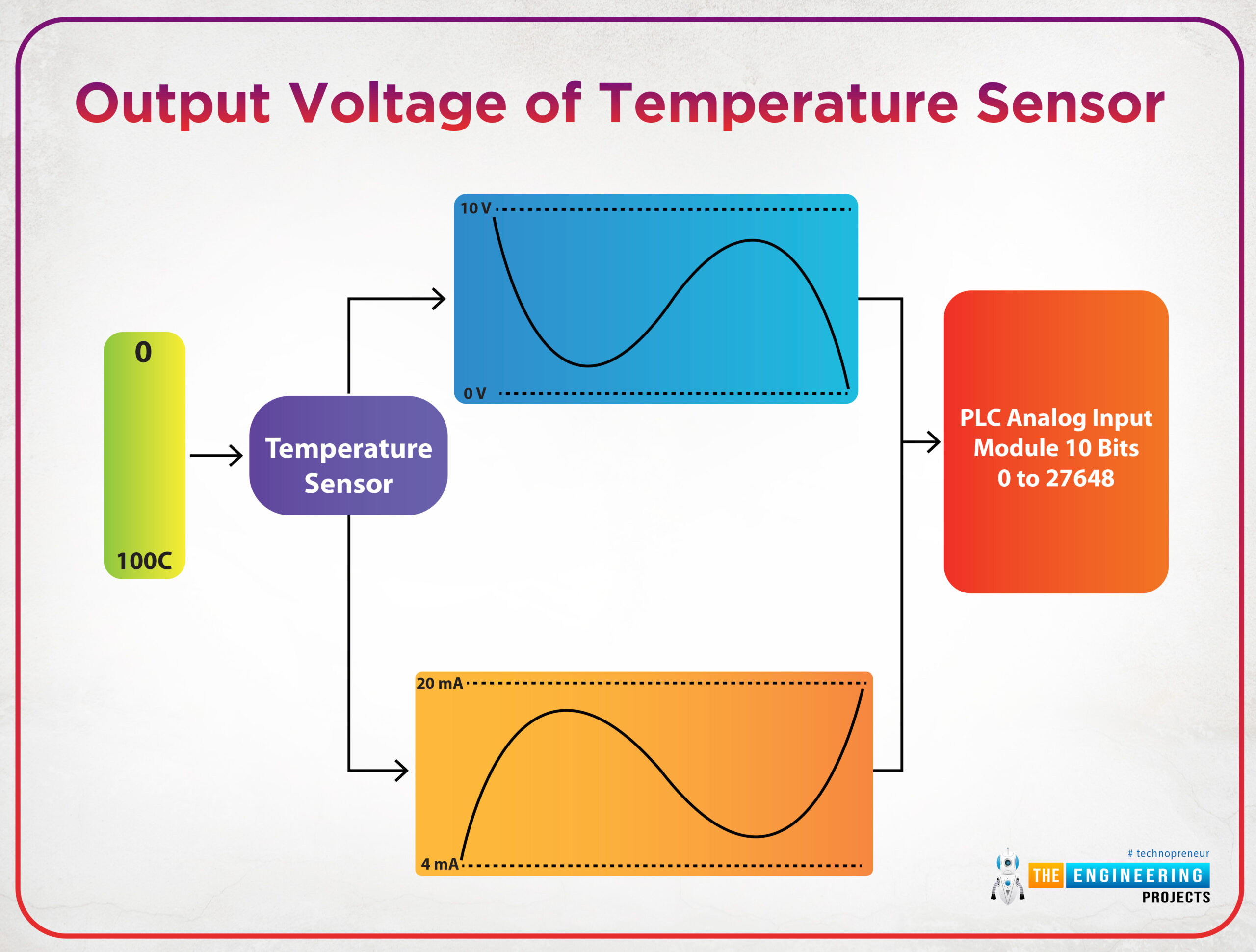
In computer systems, plc, and microcontrollers all processing work that has been done inside is processed in digital which is 0 and 1 representation. So, one may ask how analog signals which change continuously within a specific range could be processed by computers, PLCs, or microcontrollers? Well, that is an exciting question and its answer will open the door to show the aim of this tutorial. Figure 1 shows an example of analog signals of the voltage that represents the temperature sensor reading.

Scaling analog inputs, Scaling with parameters, analog input scaling, analog input scaling in plc simulator, ladder logic analog input scaling, analog input scaling in ladder logic

Fig. 1: Output voltage of temperature sensor

As you see in fig. 1, the output of the temperature sensor would be either a voltage signal or a current signal based on the type of the sensor. And the output of sensors is applied to the analog input module that converts the analog signal to a digital signal to be processed digitally by the PLC.

Scaling analog inputs

The output signals of sensors either voltage or current signal should be scaled to represent the physical signal and at the same time, it has its equivalent digital values. For example, let the temperature that is being measured has a range between 0 to 100 °C, and the sensor that we use produces voltage output from 0 to 10 v. Therefore, each 0.1 v change in voltage is equivalent to a change of 1°C. Also, assuming the maximum digital value that can be received is 4000. So, 0 V is equivalent to 0 as a digital value and 10 voltage is equivalent to 4000 as a digital value. So, it is crucial to scale the output voltage to determine accurately the equivalent change in sensors’ reading in terms of voltage to represent the temperature in digital value and the real range of the physical signal.

Scaling with parameters

Again, we have two sides to be scaled from one to the other. Therefore, the parameters that are needed for achieving such scaling are as follows:

  • The input value: represents the physical signal that comes out from a sensor. And it typically could be from 0-10v for voltage-based sensors, or it could be 4-20mA for current sensors type.
  • The scaled value represents the digital equivalent of that value. And it depends on the word size or the number of bits that we use for representation in digital format. For example, for 16 bits size, the scaled value is up to which is +/- 32768.

So we can imagine together now the scaling function block in ladder logic should be as shown in fig. 2. It shows the input minimum and maximum which could be 0 and 10v or 4 and 20mA. In addition, there are scaled min and max which could be from 0 to 32768 for 16 bits size conversion.

Scaling analog inputs, Scaling with parameters, analog input scaling, analog input scaling in plc simulator, ladder logic analog input scaling, analog input scaling in ladder logic

Fig.2: the SCP block in Allen Bradley

Analog input processing in Ladder logic

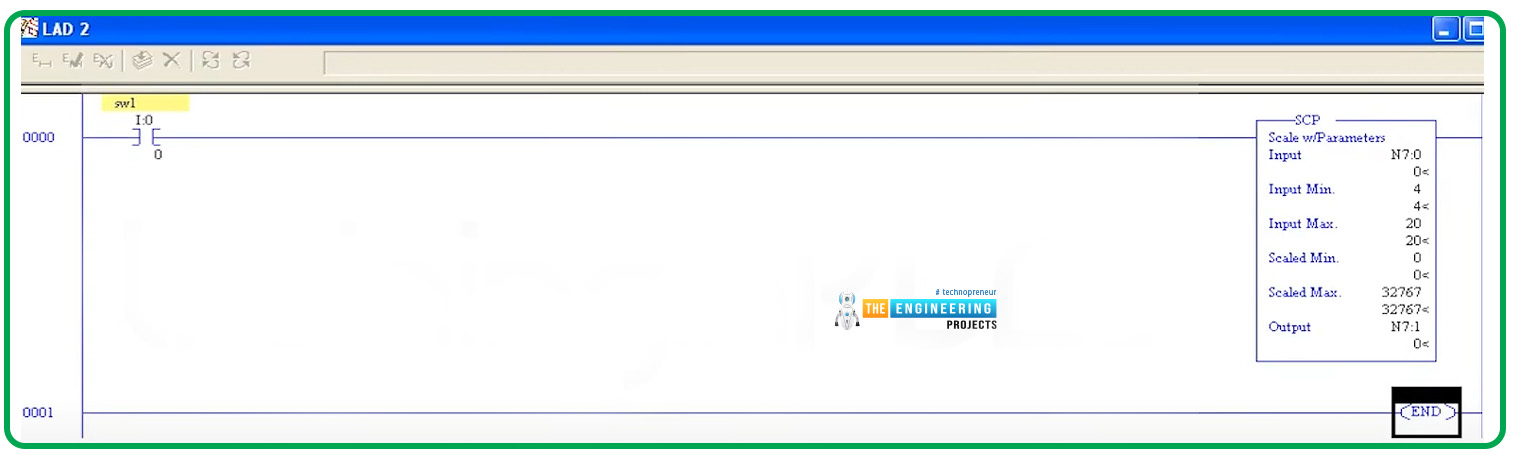
We are going to show a complete example of analog input processing in Siemens and AB as well to present the merits of analog conversion in both brands. Figure 3 shows a primitive rung of the ladder logic program that processes the analog input reading. The ladder rung uses a scaling with parameters (SCP) block that includes an input minimum of 4mA and an input maximum of 20mA. And it uses a scaled range from 0 to 32767 because it utilizes 16-bits word for representing the digital data.

Scaling analog inputs, Scaling with parameters, analog input scaling, analog input scaling in plc simulator, ladder logic analog input scaling, analog input scaling in ladder logic

Fig. 3: Ladder logic rung for analog input processing

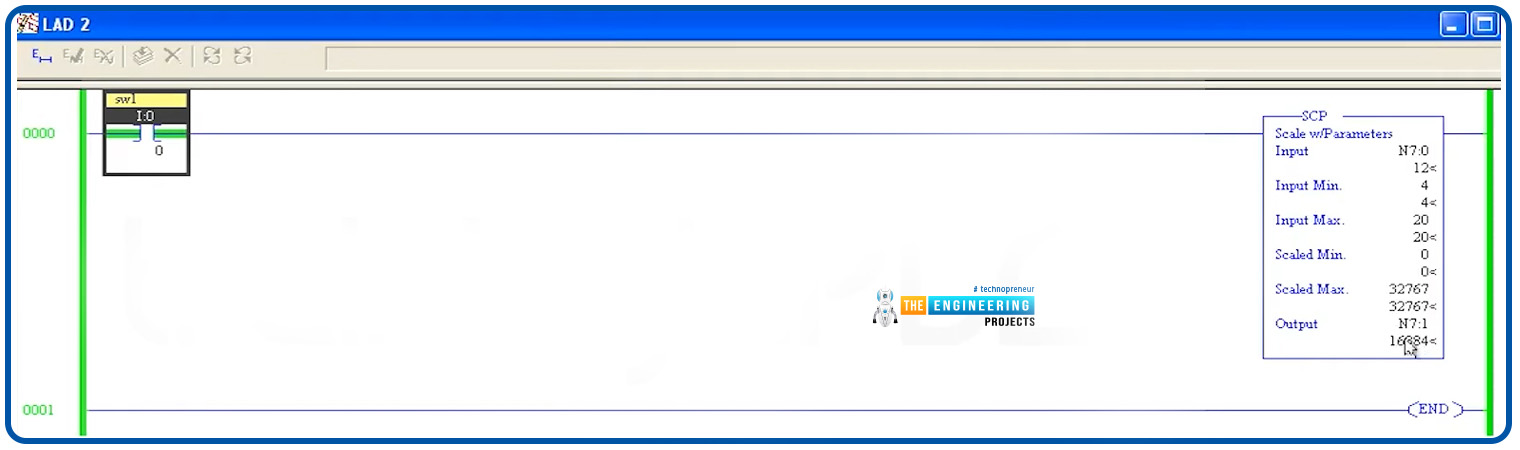
Figure 4 shows the run of the simple example which shows up the processing of analog inputs. It shows that, when the input measured value was 12mA, the output was 16884 which is pretty accurate. It is good to mention that, the output is limited to be within the range of the scaled min and max meaning that it should be from 0 to 32767.

Scaling analog inputs, Scaling with parameters, analog input scaling, analog input scaling in plc simulator, ladder logic analog input scaling, analog input scaling in ladder logic

Fig. 4: Testing analog processing by the simulator

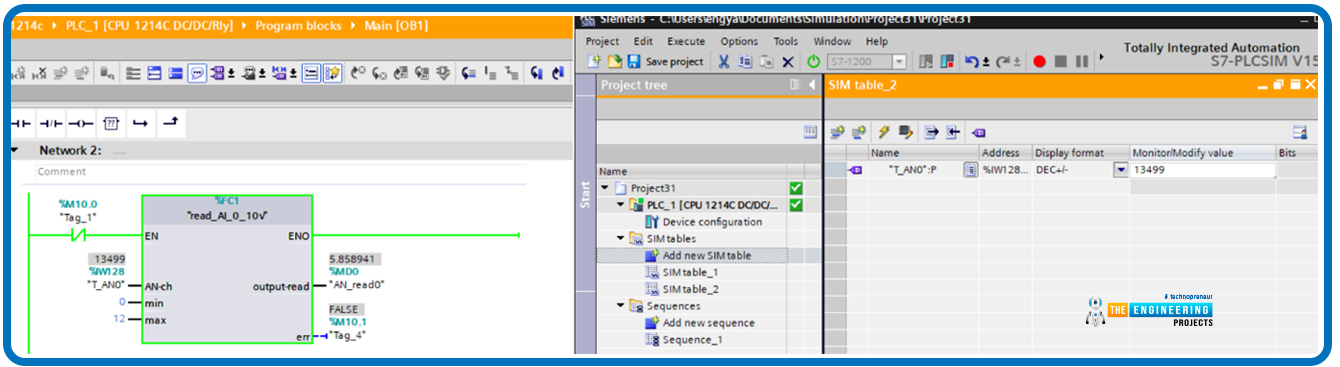
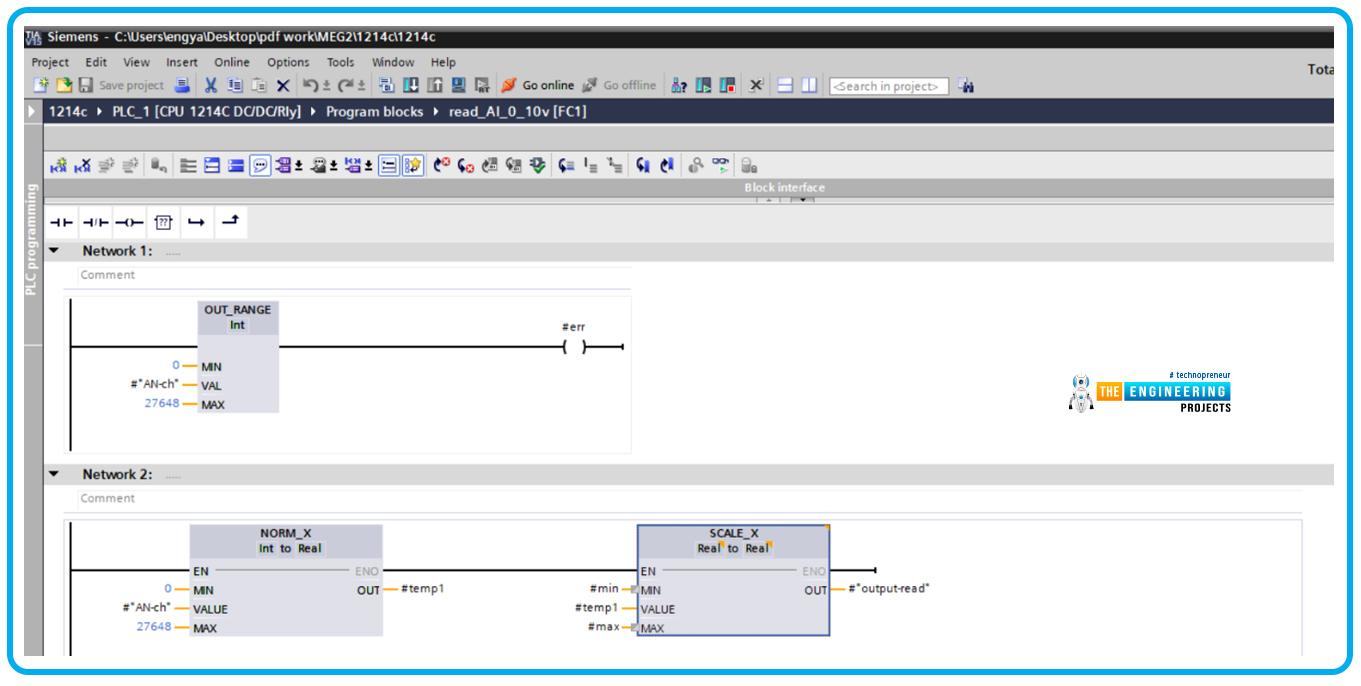
Let us give another example but in siemens s7-1200 which is represented by Fig. 5. The ladder code is very simple and it consists of two runs as shown in fig. 5; the first one is for validating the reading to be within the range which is from 0 to 27648 and the second rung is the main one which performs the analog processing in two steps. Firstly it normalizes the input based on the aforementioned range and then it scales the output back to represent it in the output signal format. In this example, we measure a battery voltage that is typically located in the range of 0 to 12v. Therefore, the min and max parameters in the scale_X block should be 0 and 12 v respectively.

Scaling analog inputs, Scaling with parameters, analog input scaling, analog input scaling in plc simulator, ladder logic analog input scaling, analog input scaling in ladder logic

Fig. 5: Example of processing analog inputs in Siemens S7-1200

Figure 6 demonstrates the test of the analog processing showing the output reported 5.858941 when the reading was 13499 which is high accuracy.

Scaling analog inputs, Scaling with parameters, analog input scaling, analog input scaling in plc simulator, ladder logic analog input scaling, analog input scaling in ladder logic

Fig. 6: Simulation of processing analog inputs in Siemens S7-1200

What’s next

I am truly thrilled to have you shared with me such a very important tutorial about analog input processing and scaling with parameters because this is a very common operation you might see in every operation in the industry as there are hundreds of sensors that read analog physical signals and be processed by the controller for deciding the next stage of the operation. Next time we are going to talk about jumping and branching techniques in the ladder logic program. So please be ready to meet very soon and learn together and enjoy practicing plc ladder programming

The post Analog Input Scaling in Ladder Logic Programming appeared first on The Engineering Projects.


Monday, 30 May 2022

Speech Recognition System Using Raspberry pi 4


Speech Recognition System Using Raspberry pi 4, speech recognition project using Raspberry Pi 4, Raspberry Pi 4 speech recognition, speech recognition with RPi4

Thank you for joining us for yet another session of this series on Raspberry Pi programming. In the preceding tutorial, we created a pi-hole ad blocker for our home network using raspberry pi 4. We also learned how to install pi-hole on raspberry pi four and how to access it in any way with other devices. This tutorial will implement a speech recognition system using raspberry pi and use it in our project. First, we will learn the fundamentals of speech recognition, and then we will build a game that uses the user’s voice to play it and discover how it all works with a speech recognition package.

Here, you’ll learn:

  • The basics of voice recognition
  • On PyPI, what packages may be found?
  • Utilize the SpeechRecognition package with a wide range of useful features.

Components

  • Raspberry pi 4
  • Microphone


Speech Recognition System Using Raspberry pi 4, speech recognition project using Raspberry Pi 4, Raspberry Pi 4 speech recognition, speech recognition with RPi4

Speech Recognition System Using Raspberry pi 4, speech recognition project using Raspberry Pi 4, Raspberry Pi 4 speech recognition, speech recognition with RPi4

A Brief Overview of Speech Recognition

Are you curious about how to incorporate speech recognition into a Python program? Well, when it comes to conducting voice recognition in Python, there are a few things you need to know first. I’m not going to overwhelm you with the technical specifics because it would take up an entire book. Things have gone a long way when it comes to modern voice recognition technologies. Several speakers can be recognized and have extensive vocabulary in several languages.

Voice is the first element of speech recognition. A mic and an analog-to-digital converter are required to turn speech into an electronic signal and digital data. The audio can be converted to text using various models once it has been digitized.

Markov models are used in most modern voice recognition programs. It is assumed that audio signals can be reasonably represented as a stationary series when seen over a short timescale.

The audio signals are broken into 10-millisecond chunks in a conventional HMM. Each fragment’s spectrogram is converted into a real number called cepstral coefficients. The dimensions of this cepstral might range from 10 to 32, depending on the device’s accuracy. These vectors are the end product of the HMM.

Training is required for this calculation because the voice of a phoneme changes based on the source and even within a single utterance by the same person. The most probable word to produce the specified phoneme sequence is determined using a particular algorithm.

This entire process could be computationally costly, as one might expect. Before HMM recognition, feature transformations and dimension reduction methods are employed in many current speech recognition programs. It is also possible to limit an audio input to only those parts which are probable to include speech using voice detectors. As a result, the recognizer does not have to waste time studying sections of the signal that aren’t relevant.

Choosing a Speech Recognition Tool

There are a few speech recognition packages in PyPI. There are a few examples:

Speech Recognition System Using Raspberry pi 4, speech recognition project using Raspberry Pi 4, Raspberry Pi 4 speech recognition, speech recognition with RPi4

NLP can discern a user’s purpose in some of these programs, which goes beyond simple speech recognition. Several other services are focused on speech-to-text conversion alone, such as Google Cloud-Speech.

SpeechRecognition is the most user-friendly of all the packages.

Voice recognition necessitates audio input, which SpeechRecognition makes a cinch. SpeechRecognition will get you up to speed in minutes rather than requiring you to write your code for connecting mics and interpreting audio files.

Since it wraps a variety of common speech application programming interfaces, this SpeechRecognition package offers a high degree of extensibility. The SpeechRecognition library is a fantastic choice for every Python project because of its flexibility and ease of usage. The APIs it encapsulates may or may not be able to support every feature. For SpeechRecognition to operate in your situation, you’ll need to research the various choices.

You’ve decided to give SpeechRecognition ago, and now you need to get it deployed in your environment.

Speech Recognition Software Installation

Using pip, you may set up Speech Recognition software in the terminal:

Speech Recognition System Using Raspberry pi 4, speech recognition project using Raspberry Pi 4, Raspberry Pi 4 speech recognition, speech recognition with RPi4Speech Recognition System Using Raspberry pi 4, speech recognition project using Raspberry Pi 4, Raspberry Pi 4 speech recognition, speech recognition with RPi4

$ pip install SpeechRecognition

When you’ve completed the setup, you should start a command line window and type:

Speech Recognition System Using Raspberry pi 4, speech recognition project using Raspberry Pi 4, Raspberry Pi 4 speech recognition, speech recognition with RPi4

Speech Recognition System Using Raspberry pi 4, speech recognition project using Raspberry Pi 4, Raspberry Pi 4 speech recognition, speech recognition with RPi4

Import speech_recognition as sr

Sr.__version__

Let’s leave this window open for now. Soon enough, you’ll be able to use it.

If you only need to deal with pre-existing audio recordings, Speech Recognition will work straight out of the box. A few prerequisites are required for some use cases, though. In particular, the PyAudio library must record audio from a mic.

As you continue reading, you’ll discover which components you require. For the time being, let’s look at the package’s fundamentals.

Recognizer Class

The recognizer is at the heart of Speech Recognition’s magic.

Naturally, the fundamental function of a Recognizer class is to recognize spoken words and phrases. Each instance has a wide range of options for identifying voice from the input audio.

The process of setting up a Recognizer is straightforward. It’s as simple as typing “in your active interpreter window.”

Speech Recognition System Using Raspberry pi 4, speech recognition project using Raspberry Pi 4, Raspberry Pi 4 speech recognition, speech recognition with RPi4

sr.Recognizer()

There are seven ways to recognize the voice from input audio by utilizing a distinct application programming interface in each Recognizer class. The following are examples:

Speech Recognition System Using Raspberry pi 4, speech recognition project using Raspberry Pi 4, Raspberry Pi 4 speech recognition, speech recognition with RPi4

Aside from recognizing sphinx(), all the other functions fail to work offline using CMU Sphinx. Internet access is required for the remaining six activities.

This tutorial does not cover all of the capabilities and features of every Application programming interface in detail. Speech Recognition comes with a preset application programming interface key for the Google Speech Application programming interface, allowing you to immediately get up and running with the service. As a result, this tutorial will extensively use the Web Speech Application programming interface. Only the Application programming interface key and the user are required for the remaining six application programming interfaces.

Speech Recognition provides a default application programming interface key for testing reasons only, and Google reserves the right to cancel it at any time. Using the Google Web application programming interface in a production setting is not recommended. There is no method to increase the daily request quota, even if you have a valid application programming interface key. If you learn how to use the Speech Recognition application programming interface today, it will be straightforward to apply to any of your projects.

Whenever a recognize function fails to recognize the voice, it will output an error message. Request Error if the application programming interface is unavailable. A faulty Sphinx install could cause this in the case of recognizing sphinx(). If quotas are exceeded, servers are unreachable, or there isn’t internet service, a Request Error will be raised for all the six methods.

Let us use recognize google() in our interpreter window and see if it works!

Speech Recognition System Using Raspberry pi 4, speech recognition project using Raspberry Pi 4, Raspberry Pi 4 speech recognition, speech recognition with RPi4

Exactly what has transpired?

Something like this is most likely what you’ve gotten.

Speech Recognition System Using Raspberry pi 4, speech recognition project using Raspberry Pi 4, Raspberry Pi 4 speech recognition, speech recognition with RPi4

I’m sure you could have foreseen this. How is it possible to tell something from nothing?

The Recognizer function recognize() expects an audio data parameter. If you’re using Speech Recognition, then audio data should become an instance of the audio data class.

To construct an AudioData instance, you have two options: you can either use an audio file or record your audio. We’ll begin with audio files because they’re simpler to work with.

Using Audio Files

To proceed, you must first obtain and save an audio file. Use the same location where your Python interpreter is running to store the file.

Speech Recognition’s AudioFile interface allows us to work with audio files easily. As a context manager, this class gives the ability to access the information of an audio file by providing a path to its location.

File Formats that are supported

This software supports various file formats, which include:

  • WAV

Speech Recognition System Using Raspberry pi 4, speech recognition project using Raspberry Pi 4, Raspberry Pi 4 speech recognition, speech recognition with RPi4

  • AIFF

Speech Recognition System Using Raspberry pi 4, speech recognition project using Raspberry Pi 4, Raspberry Pi 4 speech recognition, speech recognition with RPi4

  • FLAC

Speech Recognition System Using Raspberry pi 4, speech recognition project using Raspberry Pi 4, Raspberry Pi 4 speech recognition, speech recognition with RPi4

You’ll need to get a hold of the FLAC command line and a FLAC encoding tool.

Recording data using the record() Function

To play the “har.wav” file, enter the following commands into your interpreter window:

Speech Recognition System Using Raspberry pi 4, speech recognition project using Raspberry Pi 4, Raspberry Pi 4 speech recognition, speech recognition with RPi4

har = sr.AudioFile(‘har.wav’)

with harvard as source:

audio = r.record(source)

Using the AudioFile class source, the context manager stores the data read from the file. Then, using the record() function, the full file’s data is saved to an AudioData class. Verify this by looking at the format of the audio:

Speech Recognition System Using Raspberry pi 4, speech recognition project using Raspberry Pi 4, Raspberry Pi 4 speech recognition, speech recognition with RPi4

type(audio)

You can now use recognize_google() to see if any voice can be found in the audio file. You might have to wait a few seconds for the output to appear, based on the speed of your broadband connection.

Speech Recognition System Using Raspberry pi 4, speech recognition project using Raspberry Pi 4, Raspberry Pi 4 speech recognition, speech recognition with RPi4

r.recognize_google(audio)

Congratulations! You’ve just finished your very first audio transcription!

Within the “har.wav” file, you’ll find instances of Har Phrases if you’re curious. In 1965, the IEEE issued these phrases to evaluate telephone lines for voice intelligibility. VoIP and telecom testing continue to make use of them nowadays.

Seventy-two lists of 10 phrases are included in the Har Phrases. On the Open Voice Repository webpage, you’ll discover a free recording of these words and phrases. Each language has its own set of translations for the recordings. Put your code through its paces; they offer many free resources.

Segments with a start and end time

You may want to record a small section of the speaker’s speech. The record() method accepts the duration term parameter, which terminates the program after a defined amount of time.

Using the example above, the first 4 secs of the file will be saved as a transcript.

Speech Recognition System Using Raspberry pi 4, speech recognition project using Raspberry Pi 4, Raspberry Pi 4 speech recognition, speech recognition with RPi4

with har as source:

audio = r.record(source, duration=4)

r.recognize_google(audio)

In the files stream, utilize the record() function within a block. As a result, the 4 secs of audio you recorded for 4 seconds will be returned when you record for 4 seconds again.

Speech Recognition System Using Raspberry pi 4, speech recognition project using Raspberry Pi 4, Raspberry Pi 4 speech recognition, speech recognition with RPi4

with har as source:

audio1 = r.record(source, duration=4)

audio2 = r.record(source, duration=4)

r.recognize_google(audio1)

r.recognize_google(audio2)

As you can see, the 3rd phrase is contained within audio2. When a timeframe is specified, the recorder can cease in the middle of a word. This can harm the transcript. In the meantime, here’s what I have to say about this.

The offset keywords arguments can be passed to the record() function combined with a recording period. Before recording, this setting specifies how many frames of a file to disregard.

Speech Recognition System Using Raspberry pi 4, speech recognition project using Raspberry Pi 4, Raspberry Pi 4 speech recognition, speech recognition with RPi4

with har as source:

audio = r.record(source, offset=4, duration=3)

r.recognize_google(audio)

Using the duration and the offset word parameters can help you segment an audio track if you understand the language structure beforehand. They can, however, be misused if used hurriedly. Using the following command in your interpreter should get the desired result.Speech Recognition System Using Raspberry pi 4, speech recognition project using Raspberry Pi 4, Raspberry Pi 4 speech recognition, speech recognition with RPi4


with har as source:

audio = r.record(source, offset=4.7, duration=2.8)

r.recognize_google(audio)

The application programming interface only received “akes heat,” which matches “Mesquite,” because “it t” half of the sentence was missed.

You also recorded “a co,” the first word of the 3rd phrase after the recording. The application programming interface matched this to “Aiko.”

Another possible explanation for the inaccuracy of your transcriptions is human error. Noise! Since the audio is relatively clean, the instances mentioned above all worked. Noise-free audio cannot be expected in the actual world except if the soundtracks can be processed in advance.

Noise Can Affect Speech Recognition.

Noise is an unavoidable part of everyday existence. All audiotapes have some noise level, and speech recognition programs can suffer if the noise isn’t properly handled.

I listened to the “jackhammer” audio sample to understand how noise can impair speech recognition. Ensure to save it to the root folder of your interpreter session.

The sound of a jackhammer is heard in the background while the words “the stale scent of old beer remains” are spoken.

Try to translate this file and see what unfolds.

Speech Recognition System Using Raspberry pi 4, speech recognition project using Raspberry Pi 4, Raspberry Pi 4 speech recognition, speech recognition with RPi4

jackmer = sr.AudioFile(‘jackmer.wav’)

with jackhammer as source:

audio = r.record(source)

r.recognize_google(audio)

How wrong!

So, how do you go about dealing with this situation? The Recognizer class has an adjust for ambient noise() function you might want to give a shot.

Speech Recognition System Using Raspberry pi 4, speech recognition project using Raspberry Pi 4, Raspberry Pi 4 speech recognition, speech recognition with RPi4

with jackmer as source:

r.adjust_for_ambient_noise(source)

audio = r.record(source)

r.recognize_google(audio)

You’re getting closer, but it’s still not quite there yet. In addition, the statement’s first word is missing: “the.” How come?

Recognizer calibration is done by reading the first seconds of the audio stream and adjusting for noise level. As a result, the stream has already been consumed when you run record() to record the data.

Adjusting ambient noise() takes the duration word parameter to change the time frame for analysis. The default value for this parameter is 1, but you can change it to whatever you choose. Reduce this value by half.

Speech Recognition System Using Raspberry pi 4, speech recognition project using Raspberry Pi 4, Raspberry Pi 4 speech recognition, speech recognition with RPi4

with jackmer as a source:

r.adjust_for_ambient_noise(source, duration=0.5)

audio = r.record(source)

r.recognize_google(audio)

Now you’ve got a whole new set of problems to deal with after getting “the” at the start of the sentence. There are times when the noise can’t be removed from the signal because it simply has a lot of noise to cope with. That’s the case in this particular file.

These problems may necessitate some sound pre-processing if you encounter them regularly. Audio editing programs, which can add filters to the audio, can be used to accomplish this. For the time being, know that background noise can cause issues and needs to be handled to improve voice recognition accuracy.

Application programming interface responses might be useful whenever working with noisy files. There are various ways to parse the JSON text returned by most application programming interfaces. For the recognize google() function to produce the most accurate transcription, you must explicitly request it.

Using the recognize google() function and the show all boolean argument will do this.

Speech Recognition System Using Raspberry pi 4, speech recognition project using Raspberry Pi 4, Raspberry Pi 4 speech recognition, speech recognition with RPi4

r.recognize_google(audio, show_all=True)

A transcript list can be found in the dictionary returned by recognizing google(), with the entry ‘alternative .’This response format varies in different application programming interfaces, but it’s primarily useful for debugging purposes when you get it.

As you’ve seen, the Speech Recognition software has a lot to offer. Aside from gaining expertise with the offsets and duration arguments, you also learned about the harmful effects noise has on transcription accuracy.

The fun is about to begin. Make your project dynamic by using a mic instead of transcribing audio clips that don’t require any input from the user.

Using Microphone

Speech Recognition System Using Raspberry pi 4, speech recognition project using Raspberry Pi 4, Raspberry Pi 4 speech recognition, speech recognition with RPi4

For Speech Recognizer to work, you must obtain the PyAudio library.

Install PyAudio

Use the command below to install pyaudio in raspberry pi:

Speech Recognition System Using Raspberry pi 4, speech recognition project using Raspberry Pi 4, Raspberry Pi 4 speech recognition, speech recognition with RPi4

sudo apt-get install python-pyaudio python3-pyaudio

Speech Recognition System Using Raspberry pi 4, speech recognition project using Raspberry Pi 4, Raspberry Pi 4 speech recognition, speech recognition with RPi4

Confirmation of Successful Setup

Using the console, you can verify that PyAudio is working properly.

Speech Recognition System Using Raspberry pi 4, speech recognition project using Raspberry Pi 4, Raspberry Pi 4 speech recognition, speech recognition with RPi4

python -m speech_recognition

Ensure your mic is turned on and unmuted. This is what you’ll see if everything went according to plan:

Speech Recognition System Using Raspberry pi 4, speech recognition project using Raspberry Pi 4, Raspberry Pi 4 speech recognition, speech recognition with RPi4

Speech Recognition System Using Raspberry pi 4, speech recognition project using Raspberry Pi 4, Raspberry Pi 4 speech recognition, speech recognition with RPi4

Let SpeechRecognition translate your voice by talking into your mic and discovering its accuracy.

Microphone instance

The recognizer class should be created in a separate interpreter window.

Speech Recognition System Using Raspberry pi 4, speech recognition project using Raspberry Pi 4, Raspberry Pi 4 speech recognition, speech recognition with RPi4

import speech_recognition as sr

r = sr.Recognizer()

After utilizing an audio recording, you’ll use the system mic as your input. Instantiation your Microphone interface to get at this information!

Speech Recognition System Using Raspberry pi 4, speech recognition project using Raspberry Pi 4, Raspberry Pi 4 speech recognition, speech recognition with RPi4

mic = sr.Microphone()

For raspberry pi, you must provide a device’s index to use a certain mic. For a list of microphones, simply call our Mic class function.

Speech Recognition System Using Raspberry pi 4, speech recognition project using Raspberry Pi 4, Raspberry Pi 4 speech recognition, speech recognition with RPi4

Sr.Microphone.list_microphone_names()

Keep in mind that the results may vary from those shown in the examples.

You may find the mic’s device index using the list microphone names function. A mic instance might look like this if you wanted to use the “front” mic, which has a value of Three in the output.

mic = sr.Microphone(device_index=3)

Use listen() to record the audio from the mic

A Mic instance is ready, so let’s get started recording.

Similar to AudioFile, Mic serves as a context manager for the application. The listen() function of the Recognizer interface can be used in the with section to record audio from the mic. This technique uses an input source as its initial parameter to capture audio until quiet is invoked.

Speech Recognition System Using Raspberry pi 4, speech recognition project using Raspberry Pi 4, Raspberry Pi 4 speech recognition, speech recognition with RPi4

with mic as source:

audio = r.listen(source)

Try saying “hi” into your mic once you’ve completed the block. Please be patient as the interpreter prompts reappear. Once you hear the “>>>” prompt again, you should be able to hear the voice.

Speech Recognition System Using Raspberry pi 4, speech recognition project using Raspberry Pi 4, Raspberry Pi 4 speech recognition, speech recognition with RPi4

r.recognize_google(audio)

If the message never appears again, your mic is probably taking up the excessive background noise. Ctrl then C key can halt the execution and restore your prompts.

Recognizer class’s adjustment of ambient noise() method must be used to deal with the noise level, much like you did while attempting to decipher the noisy audio track. It’s wise to do this whenever you’re listening for mic input because it’s less unpredictable than audio file sources.

Speech Recognition System Using Raspberry pi 4, speech recognition project using Raspberry Pi 4, Raspberry Pi 4 speech recognition, speech recognition with RPi4

with mic as source:

r.adjust_for_ambient_noise(source)

audio = r.listen(source)

Allow for adjustment of ambient noise() to finish before speaking “hello” into the mic after executing the code mentioned above. Be patient as the interpreter’s prompts reappear before ascertaining the speech.

Keep in mind that the audio input is analyzed for a second by adjusting ambient noise(). Using the duration parameter, you can shorten it if necessary.

According to the website, not under 0.5 secs is recommended by the Speech Recognition specification. There are times when greater durations are more effective. The lower the ambient noise, the lower the value you need. Sadly, this knowledge is often left out of the development process. In my opinion, the default one-second duration is sufficient for most purposes.

How to handle speech that isn’t recognizable?

Using your interpreter, type in the above code snippet and mutter anything nonsensical into the mic. You may expect a response such as this:

Speech Recognition System Using Raspberry pi 4, speech recognition project using Raspberry Pi 4, Raspberry Pi 4 speech recognition, speech recognition with RPi4

An UnknownValueError exception is thrown if the application programming interface cannot translate speech into text. You must always encapsulate application programming interface requests in try and except statements to address this problem.

Getting the exception thrown may take more effort than you imagine. When it comes to transcribing vocal sounds, the API puts in a lot of time and effort. For me, even the tiniest of noises were translated into words like “how.” A cough, claps of the hands, or clicking the tongue would all raise an exception.

A “Guess the Word” game to Put everything together

To put what you’ve learned from the SpeechRecognition library into practice, develop a simple game that randomly selects a phrase from a set of words and allows the player three tries to guess it.

Speech Recognition System Using Raspberry pi 4, speech recognition project using Raspberry Pi 4, Raspberry Pi 4 speech recognition, speech recognition with RPi4

Speech Recognition System Using Raspberry pi 4, speech recognition project using Raspberry Pi 4, Raspberry Pi 4 speech recognition, speech recognition with RPi4

Listed below are all of the scripts:

import random

import time

import speech_recognition as sr

def recognize_speech_from_mic(recognizer, microphone):

if not isinstance(recognizer, sr.Recognizer):

raise TypeError(“`recognizer` must be `Recognizer` instance”)

if not isinstance(microphone, sr.Microphone):

raise TypeError(“`microphone` must be `Microphone` instance”)

with microphone as source:

recognizer.adjust_for_ambient_noise(source)

audio = recognizer.listen(source)

response = {

“success”: True,

“error”: None,

“transcription”: None

}


try: response[“transcription”] = recognizer.recognize_google(audio)

except sr.RequestError:

response[“success”] = False

response[“error”] = “API unavailable”

except sr.UnknownValueError:

response[“error”] = “Unable to recognize speech”

return response

if __name__ == “__main__”:

WORDS = [“apple”, “banana”, “grape”, “orange”, “mango”, “lemon”]

NUM_GUESSES = 3

PROMPT_LIMIT = 5

recognizer = sr.Recognizer()

microphone = sr.Microphone()

word = random.choice(WORDS)

instructions = (

“I’m thinking of one of these words:\n”

“{words}\n”

“You have {n} tries to guess which one.\n”

).format(words=’, ‘.join(WORDS), n=NUM_GUESSES)

print(instructions)

time.sleep(3)

for i in range(NUM_GUESSES):

for j in range(PROMPT_LIMIT):

print(‘Guess {}. Speak!’.format(i+1))

guess = recognize_speech_from_mic(recognizer, microphone)

if guess[“transcription”]:

break

if not guess[“success”]:

break

print(“I didn’t catch that. What did you say?\n”)

if guess[“error”]:

print(“ERROR: {}”.format(guess[“error”]))

break

print(“You said: {}”.format(guess[“transcription”]))

guess_is_correct = guess[“transcription”].lower() == word.lower()

user_has_more_attempts = i < NUM_GUESSES – 1

if guess_is_correct:

print(“Correct! You win!”.format(word))

break

elif user_has_more_attempts:

print(“Incorrect. Try again.\n”)

else:

print(“Sorry, you lose!\nI was thinking of ‘{}’.”.format(word))

break

Let’s analyze this a little bit further.

There are three keys to this function: Recognizer and Mic. It takes these two as inputs and outputs a dictionary. The “success” value indicates the success or failure of the application programming interface request. It is possible that the 2nd key, “error,” is a notification showing that the application programming interface is inaccessible or that a user’s speech was incomprehensible. As a final touch, the audio input “transcription” key includes a translation of all of the captured audio.

A TypeError is raised if the recognition system or mic parameters are invalid:

Speech Recognition System Using Raspberry pi 4, speech recognition project using Raspberry Pi 4, Raspberry Pi 4 speech recognition, speech recognition with RPi4

Using the listen() function, the mic’s sound is recorded.

Speech Recognition System Using Raspberry pi 4, speech recognition project using Raspberry Pi 4, Raspberry Pi 4 speech recognition, speech recognition with RPi4

For every call to recognize speech from the mic(), the recognizer is re-calibrated using the adjust for ambient noise() technique.

After that, whether there is any voice in the audio, recognize function is invoked to translate it. RequestError and UnknownValueError are caught by the try and except block and dealt with accordingly. Recognition of voice from a microphone returns a dictionary containing the success, error, and translated voice of the application programming interface request and the dictionary keys.

Speech Recognition System Using Raspberry pi 4, speech recognition project using Raspberry Pi 4, Raspberry Pi 4 speech recognition, speech recognition with RPi4

In an interpreter window, execute the following code to see if the function works as expected:

Speech Recognition System Using Raspberry pi 4, speech recognition project using Raspberry Pi 4, Raspberry Pi 4 speech recognition, speech recognition with RPi4

import speech_recognition as sr

from guessing_game import recognize_speech_from_mic

r = sr.Recognizer()

m = sr.Microphone()

recognize_speech_from_mic(r, m)

The actual gameplay is quite basic. An initial set of phrases, a maximum of guesses permitted, and a time restriction are established:

Speech Recognition System Using Raspberry pi 4, speech recognition project using Raspberry Pi 4, Raspberry Pi 4 speech recognition, speech recognition with RPi4

Once this is done, a random phrase is selected from the list of WORDS and input into the Recognizer and Mic instances.

Speech Recognition System Using Raspberry pi 4, speech recognition project using Raspberry Pi 4, Raspberry Pi 4 speech recognition, speech recognition with RPi4

After displaying some directions, the condition statement is utilized to handle each user’s attempts at guessing the selected word. This is the first operation that happens inside of the first loop. Another loop tries to identify the person’s guesses at least PROMPT LIMIT instances and stores the dictionary provided to a variable guess.

Otherwise, a translation was performed, and the closed-loop will end with a break in case the guess “transcription” value is unknown. False is set as an application programming interface error when no audio is transcribed; this causes the loop to be broken again with a break. Aside from that, the application programming interface request was successful; nonetheless, the speech was unintelligible. As a precaution, the for loop repeatedly warns the user, giving them a second chance to succeed.

Speech Recognition System Using Raspberry pi 4, speech recognition project using Raspberry Pi 4, Raspberry Pi 4 speech recognition, speech recognition with RPi4

If there are any errors inside the guess dictionary, the inner loop will be terminated again. An error notice will be printed, and a break is used to exit the outer for loop, which will stop the program execution.

Speech Recognition System Using Raspberry pi 4, speech recognition project using Raspberry Pi 4, Raspberry Pi 4 speech recognition, speech recognition with RPi4

Transcriptions are checked for accuracy by comparing the entered text to a word drawn at random. As a result, the lower() function for text objects is employed to ensure a more accurate prediction. In this case, it doesn’t matter if the application programming interface returns “Apple” or “apple” as the speech matching the phrase “apple.”

If the user’s estimate was correct, the game is over, and they have won. The outermost loop restarts when a person guesses incorrectly and a fresh guess is found. Otherwise, the user will be eliminated from the contest.

Speech Recognition System Using Raspberry pi 4, speech recognition project using Raspberry Pi 4, Raspberry Pi 4 speech recognition, speech recognition with RPi4

This is what you’ll get when you run the program:

Speech Recognition System Using Raspberry pi 4, speech recognition project using Raspberry Pi 4, Raspberry Pi 4 speech recognition, speech recognition with RPi4

Recognition of Other Languages

Speech recognition in other languages, on the other hand, is entirely doable and incredibly simple.

The language parameter must be set to the required string to use the recognize() function in a language other than English.

Speech Recognition System Using Raspberry pi 4, speech recognition project using Raspberry Pi 4, Raspberry Pi 4 speech recognition, speech recognition with RPi4

r = sr.Recognizer()

with sr.AudioFile(‘path/to/audiofile.wav’) as source:

audio = r.record(source)

r.recognize_google(audio, language=’fr-FR’)

There are only a few methods that accept-language keywords:

Speech Recognition System Using Raspberry pi 4, speech recognition project using Raspberry Pi 4, Raspberry Pi 4 speech recognition, speech recognition with RPi4

What are the applications of speech recognition software?

  1. Mobile Payment with Voice command

Do you ever have second thoughts about how you’re going to pay for future purchases? Has it occurred to you that, in the future, you may be able to pay for goods and services simply by speaking? There’s a good chance that will happen soon! Several companies are already developing voice commands for money transfers.

This system allows you to speak a one-time passcode rather than entering a passcode before buying the product. When it comes to online security, think of captchas and other one-time passwords that are read aloud. This is a considerably better option than reusing a password every time. Soon, voice-activated mobile banking will be widely used.

  1. AI Assistants

When driving, you may use such Intelligent systems to get navigation, perform a Google search, start a playlist of songs, or even turn on the lights in your home without touching your gadget. These digital assistants are programmed to respond to every voice activation, regardless of the user.

There are new technologies that enable Ai applications to recognize individual users. This tech, for instance, allows it to respond to the voice of a certain person exclusively. Using an iPhone as an example, it’s been around for a few years now. If you want Siri to only respond to your commands and queries when you speak to it, you can do so on your iPhone. Unauthorized access to your gadgets, information, and property is far less possible when your voice can only activate your Artificial intelligent assistant. Anyone who is not permitted to use the assistant will not be able to activate it. Other uses for this technology are almost probably on the horizon.

  1. Translation Application

In a distant place, imagine attempting to check into an unfamiliar hotel. Since neither you nor the front desk employee is fluent in the other country’s language, no one is available to act as a translator. You can use the translator device to talk into the microphone and have your speech processed and translated verbally or graphically to communicate with another person.

Additionally, this tech can benefit multinational enterprises, educational institutions, or other institutions. You can have a more productive conversation with anyone who doesn’t speak your language, which helps break down the linguistic barrier.

Conclusion

There are many ways to use the SpeechRecognition program, including installing it and utilizing its Recognizer interface, which may be used to recognize audio from both files and the mic. You learned how to use the record offset and the duration keywords to extract segments from an audio recording.

The recognizer’s tolerance to noise level can be adjusted using the adjust for the ambient noise function, which you’ve seen in action. Recognizer instances can throw RequestErrors and UnknownValueErrors, and you’ve learned how to manage them with try and except block.

More can be learned about speech recognition than what you’ve just read. We will implement the RTC module integration in our upcoming tutorial to enable real-time control.

The post Speech Recognition System Using Raspberry pi 4 appeared first on The Engineering Projects.